Counter: Take payment without buying a card reader.
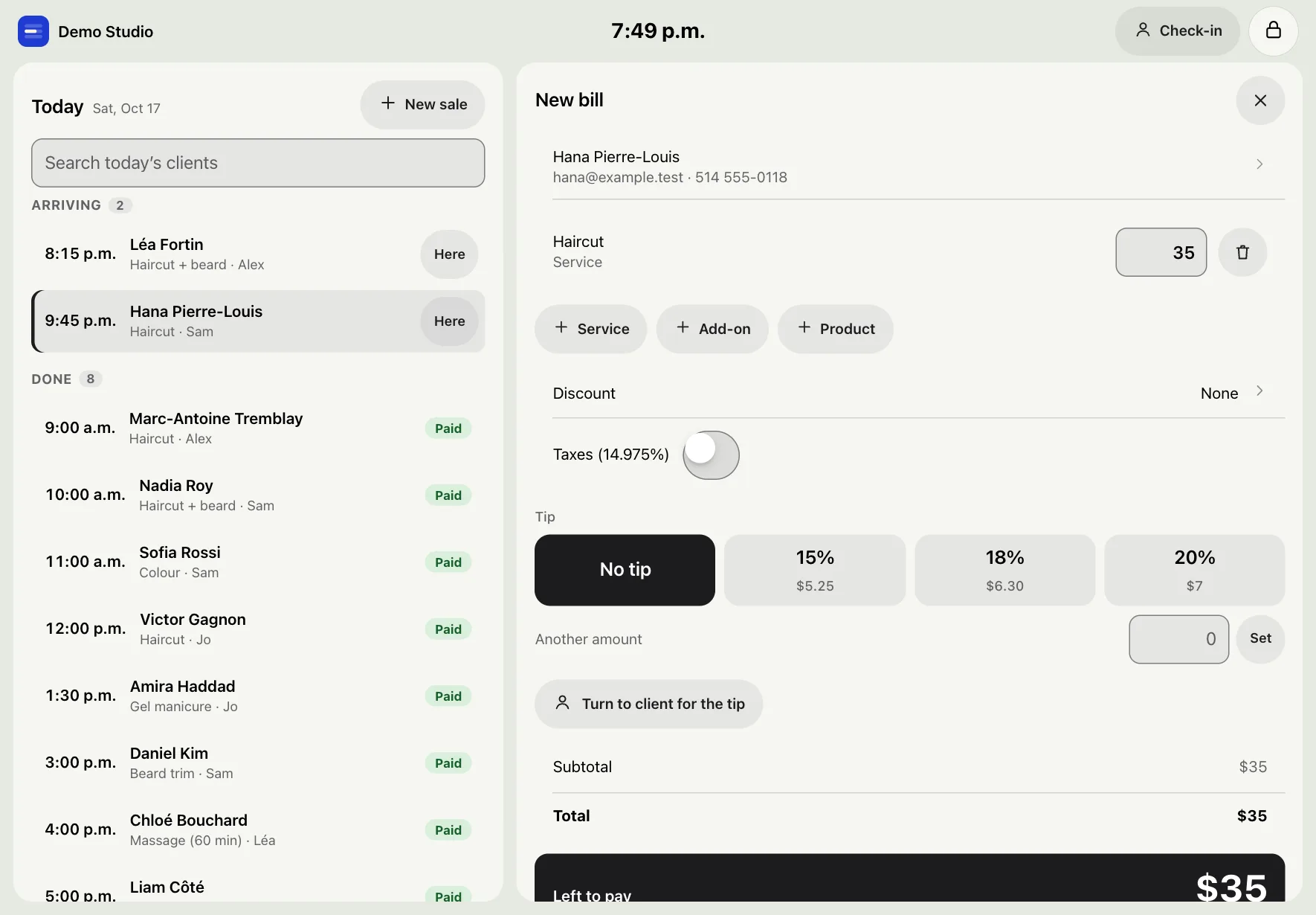
One bill for the visit: services, products, discount, tax and tip. The client pays on their own phone by QR code, or in cash. Your iPad becomes the counter. Your money goes straight to your own Stripe or Square account.
Free for 30 days. No credit card.
What Counter does
Checkout
One bill with services, add-ons, products, a discount, GST and QST, and the tip. Cash, QR pay or another way, on the same bill. Close the cash drawer at the end of the day.
iPad counter
Turn the shop’s iPad into the counter: today’s clients, the bill, and “turn to client” for the tip. Clients can check themselves in. A PIN locks the rest of the app.
Tap to Pay on iPhone Coming soon
The client taps their card or phone on your iPhone. It comes with the Rndez iPhone app, which waits on Apple’s approval, and a Stripe account. Until then, QR pay works on any phone.
Tips
15, 18 or 20 percent in one tap, or another amount. Clients can also tip later from a pay link. Rndez takes no fee on tips.
Gift cards
Sell gift cards online and at the counter. The person gets a code by email and pays with it on any bill. Off until you turn it on.
Memberships and packs
A monthly membership charged to the client’s card, or a pack like “5 massages”. Booked visits use them up on their own.
Pay later
With a Stripe account, clients can pay deposits and pay links with Afterpay, Klarna or Affirm. You get the full amount.
Invoices
Bill a client or a company with a numbered invoice. They pay by card on the link, or you mark cash, e-transfer or cheque, in parts if need be.
Who uses it
The price: Included in both prices: $19 CAD a month (about US$14) and $49 CAD (about US$36). No fee per client. See pricing →
The rest of Rndez
Questions
Can I take card payments at the counter?
Yes. Open one bill with the services, products, tip and tax. The client scans a QR code and pays on their own phone with Apple Pay, Google Pay or a card. The money goes to your own Stripe or Square account. Cash can go on the same bill.
Do I need a card reader?
No. QR pay works on any phone: the client pays on theirs. Tap to Pay on iPhone, where the client taps their card or phone on your iPhone, comes with the Rndez iPhone app (coming soon) and a Stripe account.
What fees are there?
On Solo and Shop, Rndez takes nothing from your card payments: no fee per client. On Free, Rndez takes 1% of each card payment, and nothing on cash or tips. Stripe’s or Square’s own card fee applies on every plan. See every fee
Can clients pay in instalments?
Yes, with a Stripe account. Turn on Afterpay, Klarna or Affirm in Settings → Payments, taxes and tips. Clients can use them on deposits and pay links, but not on a deposit when you may charge a no-show fee. You get the full amount. Stripe takes its fee.

Send your link. Let clients book themselves.
Add your services and hours. Share your link. You’re open for booking.
Free for 30 days. No credit card.